Tuesday, August 27, 2013

How to Restart a Failed Process Chain if Repeat Option is not Applicable

Introduction

Sometimes the process chain fails at particular step due to some kind of error and the “Repeat” option also
will not be applicable for the failed process. This article explains the steps for how to complete the process
chain and get the issue resolved.

Business Scenario

1. Data is loaded from R3 to BI using process chain. Variants involved in process chain are to load data
from R3 to different InfoProviders in BI.
2. Data is loaded successfully in one of the DSO (Z_OFCPS), but the process chain failed while further
data load to next DSO (Z_OPSF01).
3. This is because while doing the delta update, there are some erroneous records found and the process
chain failed.
4. Manual corrections are made on the erroneous records and uploaded data manually in the DSO
(Z_OPSF01).
5. The process chain is restarted from the One Step Ahead where it was failed as the manual corrections
are done and loaded data. Therefore, that step has to be skipped. (Also as process chain contains many
steps to be executed, and doing it manually is not a best practice.)

Step by Step Solution

The process chain fails at the step below while loading data into InfoProvider (marked in red box).


Process chain failure at this step is due to the erroneous records. It is necessary to manually correct it and
load data manually into the respective InfoProviders.
Once the data is loaded successfully at this step, start the process chain from next step onward as this step
is not required to execute again.

Finding the Variants and Instance of the Failed Process

Right-click the failed process. Select the Displaying Messages option.


It will open the screen as below.


Copy the Variant and Instance from above screen.
Go to the transaction SE11. Select the table – RSPCPROCESSLOG. 
Put the value for variant and instance received from above screen.


Execute this, and the value of the other fields is returned: LOG_ID, TYPE, BATCHDATE and BATCHTIME.

Report to Execute Process Chain

Go to the transaction SE38. Enter the program name - RSPC_PROCESS_FINISH and execute.
Enter the values in the fields received from above table. Additionally, make the STATE as „G‟ -> Execute.
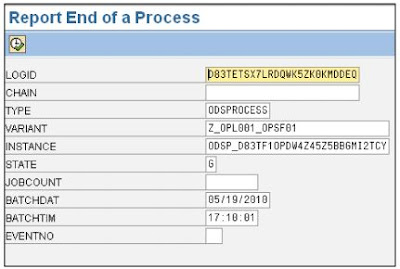

Once the program is executed with all mandatory fields as described above, it will move the process chain to the next step. And the process chain execution will start from that step as below screenshot. Also it will mark
the previously failed step as green.

The next data load can be done smoothly.

Monday, August 26, 2013

Inventory Management (0IC_C03) Part:2


Introduction:

To monitor the Inventory Management and to take any decisions on Inventory Controlling, 
Management/Users need reports on Inventory Management; basically they need complete status/details of 
the all Materials i.e. from Raw Materials to Finished Goods. I.e. In-Flow and Out-Flow of the Materials in the Organization.
In the coming Articles we will discuss about Process Keys and Movement Types and other details.

DataSources:

A DataSource is a set of fields that provide the data for a business unit for data transfer into BI System. From 
a technical viewpoint, the DataSource is a set of logically-related fields that are provided to transfer data into 
BI in a flat structure (the extraction structure), or in multiple flat structures (for hierarchies).
There are two types of DataSource (Master Data DataSources are split into three types.):
1. DataSource for Transaction data.
2. DataSource for Master data.
a) DataSource for Attributes.
b) DataSource for Texts.
c) DataSource for Hierarchies.
To full fill the Industry requirements, SAP given the following Transactional DataSources for Inventory 
Management/ Materials Management.
1. 2LIS_03_BX : Stock Initialization for Inventory Management.
2. 2LIS_03_BF : Goods Movements From Inventory Management.
3. 2LIS_03_UM : Revaluations.
All the above DataSources are used to extract the Inventory Management/ Materials Management data from 
ECC to BI/BW.

About 2LIS_03_BX DataSource:

This DataSource is used to extract the stock data from MM Inventory Management for initialization 
to a BW system, to enable the functions for calculating the valuated sales order stock and of the 
valuated project stock in BW.
See the SAP help on 2LIS_03_BX DataSource.

About 2LIS_03_BF DataSource:

This DataSource is used to extract the material movement data from MM Inventory Management 
(MM-IM) consistently to a BW system. A data record belonging to extractor 2LIS_03_BF is defined 
in a unique way using the key fields Material Document Number (MBLNR), Material Document 
Year (MJAHR), Item in Material Document (ZEILE), and Unique Identification of Document Line 
(BWCOUNTER).
See the SAP help on 2LIS_03_BF DataSource.

About 2LIS_03_UM DataSource:

This DataSource is used to extract the revaluation data from MM Inventory Management (MM-IM) 
consistently to a BW system.
See the SAP help on 2LIS_03_UM. DataSource.
To use the all above DataSources, first you need to install in ECC. See the steps given below.

How to Install?

In ECC using Transaction Code RSA5, we can install the above DataSources. SAP given all DataSources in the form of “Delivered Version (From this System)”, once you install it, then the status will changes to “Active Version”.


Select the DataSources one by one and Click on Activate DataSources.


Post Process DataSources:

Once we install the DataSources, it will be available in RSA6 and you can see the DataSources in RSA6.
So go to Transaction Code RSA6 and then do the Post Processing steps that are required for DataSources.


Select DataSource and then click on Change Icon and


Once you click on Change Icon, it will go to DataSource Customer Version, here you can hide the unwanted fields and you can select the fields for Data Selection in InfoPackage. After that you save and come back.


Selection:

Set this indicator to use a field from the DataSource as the selection field in the Scheduler for BW. Due to the properties of the DataSource, not every field can be used as a selection field.

Hide Field:

To exclude a field in the extraction structure from the data transfer, set this flag. The field is then no longer available in BW for determining transfer rules and therefore cannot be used for generating transfer structures.

Inversion:

Field Inverted When Cancelled (*-1)
The field is inverted in the case of reverse posting. This means that it is multiplied by (-1). For this, the extractor has to support a delta record transfer process, in which the reverse posting is identified as such.
If the option Field recognized only in Customer Exit is chosen for the field, this field is not inverted. You cannot activate or deactivate inversion if this option is set.


Inventory Management (0IC_C03) Part:1

What is Inventory Management?

Inventory management is primarily about specifying the size and placement of stocked goods. Inventory
management is required at different locations within a facility or within multiple locations of a supply network
to protect the regular and planned course of production against the random disturbance of running out of
materials or goods. The scope of inventory management also concerns the fine lines between replenishment
lead time, carrying costs of inventory, asset management, inventory forecasting, inventory valuation,
inventory visibility, future inventory price forecasting, physical inventory, available physical space for
inventory, quality management, replenishment, returns and defective goods and demand forecasting.
The Inventory Management system provides information to efficiently manage the flow of materials,
effectively utilize people and equipment, coordinate internal activities, and communicate with customers.
Inventory Management and the activities of Inventory Control do not make decisions or manage operations;
they provide the information to Managers who make more accurate and timely decisions to manage their
operations.

Building blocks for the Inventory Management system:

Sales Forecasting or Demand Management
Sales and Operations Planning
Production Planning
Material Requirements Planning
Inventory Reduction

Inventory Management Process:

This process allows users to manage all the Materials/items purchased, manufactured, sold, or kept in stock.
For each Material/item, users enter the data relevant for a particular area in the system. This data is used
automatically by the system for purchasing, sales, production, inventory management, accounting and etc...
It provides optimum support for business. Helps create orders, delivery notes, and outgoing invoices,
automatically calculating prices, sales units, and gross profit. Enables complete control over stock quantities
at all times and lets users analyze the financial aspects of stockholding at the same time. Allows users to
control production on the basis of the items that are used for production and on the basis of the finished
product and any by-products created.

The Purpose of SAP - Inventory Management:

Today most of the industries/companies implemented SAP and also implementing SAP, because SAP is
giving the full-fledged solution for their Business Requirements and it is meeting Customer/Client
requirements without huge Customization.
For example, If you take FMCG industries, they want to know the status of their Inventory on
Daily/Weekly/Monthly/Yearly basis. Because at the end of the day, Management wants to know the
movements of the Goods/Products for their future planning and also to maintain the balance between
Demand and Supply.
The main components are:
Management of material stocks on a quantity and value basis.
Planning, Entry, and Documentation of all Goods Movements.
Carrying out the Physical Inventory.
Look into the following Business Process & Inventory Analyses diagram:


Inventory Management System


Integration with other Modules:

Inventory Management is part of the Materials Management and it is fully integrated with the following other 
modules in SAP. So with this we can easily track the whole information/transactions of the 
Materials Management
Production Planning
Sales & Distribution
Quality Management
Plant Maintenance
Logistics Information System

How to Monitor?

In any organization to Monitor the all Inventory Management activities, from Shop Floor Executive’s to Top 
Manager’s they need good reports, so it is highly difficult to take such kind of MM reports in ECC (OTLP 
System), so for that we need to implement SAP-BI/BW and generate reports in SAP-BI/BW (OLAP System).
Especially, if you want to generate the reports for all Materials and Plant combinations which contain MTD 
and YTD calculations, it is very difficult in ECC (OLTP Server).

Inventory Data Flow Diagram from ECC to BI/BW:

To take all kind of Inventory Management SAP given 0IC_C03 InfoCube, which will use three DataSources, 
see the below figure.


In the coming Articles we are going to discuss about the above Dataflow. I.e. configuring the DataSources in ECC, Mapping to InfoCube in BI/BW, Data Loads to InfoCube and Reports.

Some important Reports Details: 

Few important reports names given below…
Stock Ledger Report
Stock Overview Report.
Demand Supply Match Report.
Valuated Stock Report.
Inventory Aging Report.
Inventory Turnover Report.
Stock in Transit Report.
Scrap Report.
Blocked Stock Report.
Days' Supply Report.
Receipt and Issue Consignment Stock at Customer Report.

Conclusion & Benefits:

For optimal inventory management processes, we need robust functionality for managing our logistics
facilities. Support for Inventory Management helps us record and track of each materials on the basis of both
Quantity and Value.
We can reduce the cost for warehousing, transportation, order fulfillment, and material handling – while
improving customer service. We can significantly improve inventory turns, optimize the flow of goods, and
shorten routes within our warehouse or HUB/distribution center. Additional benefits of inventory management
include improved cash flow, visibility, and fast and good decision making.
Inventory management offers one of the largest opportunities in supply chain management. End-to-end
inventory visibility increases buyer purchasing power, minimizes inventory levels, ensures product balance,
and ultimately reduces warehousing costs.

Friday, June 14, 2013

How to apply or implement SAP OSS notes

Go to transaction SNOTE to check compatibly of SAP OSS notes to your current environment and to implement them. You need to have authorization for this T-Code which is generally restricted to BASIS team members. 
1. Go to Transaction Code SNOTE

2. Click on "Download SAP note" button.
3. Provide OSS note number and hit execute button.

4. You will see that note is downloaded under "New"


5. Double click on the note you just downloaded.
6. The next screen will show if a note can be implemented in the implementation status field. 

7. As we can see our note can be implemented. Click on execute button at the top left hand corner of the screen.
8. Depending the note you will get several prompts asking you to confirm or execute next steps. Say yes or execute the steps as required. System will automatically make required changes as you go through this process.

9. If there are any manualy steps that need to be performed (the steps that system can't doautomatically like adding new fields to tables/structures etc). Please see yes to this prompt. Please note that you would need to manually perform these actions (like going into se11 and adding fields to structure).
10. It will ask you for a transport number provide transport number. You use transport to move the changes made this note from development to other environments in your landscape.
11. After successful implementation you can see the status "Completely implemented" as below.

Thursday, June 13, 2013

SAP BW 7.3 - New Feature: Switch Info package in PC to Delta

As of BW 7.0 we need to manually change all the delta init packages in the process chains to delta when we move the changes to QA or Production environments or we have to create separate delta init packages and manually run them to do initialization before we could schedule the process chains with delta info packages. This is going to change in SAP BW 7.3. 
 There is a new option "Switch Info Package. In PC to Delta" under update tab of info package. If we check this option the info package will be automatically executed as delta package if already there is a successful initialization. Otherwise, it will be executed as ainit package when there is no successful initialization. This will be useful and save us some time with new projects and enhancements. 
Screenshot of "Switch Infopackage.in PC to Delta" option

F1 Help for 'Switch Infopackage. in PC to Delta"

Convert Initial Info Package into Delta Info Package

You use this indicator to specify whether you want the system to automatically convert an Info Package that is being used in a process chain into a delta Info Package when the delta transfer has been initialized successfully.

Use

If you set this indicator, the following applies to the Info Package when it is executed in a process chain.
·         If you set the Initialization of Delta Process indicator on the Update tab page and there is no active initialization request with the same or overlapping selections for this DataSource/source system combination, the Info Package is executed as an initialization Info Package.

·         If there are one or more active initialization requests with the same or overlapping selections for this DataSource/source system combination, the InfoPackage is converted to a delta InfoPackage just before it is executed in the process chain.
After it has been converted, the Info Package stays as a delta Info Package in the process chain.

SAP BW 7.3 - New Feature: Automatically repeat red DTP requests in Process Chains

This is another cool nice feature in SAP BW 7.3. Sometimes DTP load fails with one off error messages like RFC connection error, missing packets, database connection issues etc. Usually these are resolved by repeating the failed DTP load. 
In BW 7.3 there is an option under execute tab which if you check will automatically repeat red requests in process chains. I think this is a cool feature and saves us time and effort in monitoring data loads. 

Below is F1 help on this option.

Automatically Repeat Red Requests in Process Chains

If a data transfer process (DTP) has produced a request containing errors during the previous run of a periodically scheduled process chain, this indicator is evaluated the next time the process chain is started.
If the indicator is set, the previous request that contains errors is automatically deleted and a new one is started.
If the indicator is not set, the DTP terminates and an error message appears explaining that no new request can be started until the previous request is either repaired or deleted.

Use

If you set the indicator, you reduce the administrative effort for process chains. Terminated process chains can repair themselves.

Dependencies

Note that if a delta update is carried out, the repaired request contains not only the data of the terminated request, but all data that has been added to the source since then. This can lead to both performance and consistency problems.

Example of a Consistency Problem:


A transfer that has the prerequisite that the data of only one day is transferred at a time, and that produces incorrect results, leads to consistency problems if, during the repair, the data of more than one day is to be transported at the same time.

Friday, September 21, 2012

Multi providers


Multi providers (just a structure, not a physical data store object like cube or ODS) is the union of infoproviders namely Infocubes, ODS , master data tables.

This is just a union of more than one infoproviders, for example if you have a requirement that you need to compare plan data vs actual data OR last year data vs current year ...or similar scenarios. Then it may be easy hassle to create different cube and create a multiprovider then design your report out of multiprovider. Just keep in mind that you need to have at least one similar char in all the infoproviders which includes in your multiprovider.
You can create multprovider of any of the following:

  1. Infocube
  2. ODS
  3. InfoObject
  4. Infosets.

Identification Tab:

Identification tab is for system to identify which char. in multiprovider maps to which characteristic in the specific base providers.

The same characteristic may be present in more than one of the base InfoProviders of the multiprovider.

Also one characteristic in the multiprovider can be matched to another characteristic in one of the base providers which is of similar data type and length.

E.g. you could match 0CUSTOMER and 0SOLD_TO (because 0SOLD_TO has reference characteristic 0CUSTOMER), but it is not possible to match e.g. 0MATERIAL and 0MAT_SALES (because 0MAT_SALES is compounded to 0SALESORG etc.).

Eg: If you have 0VENDOR in ODS1 and ZVENDOR in ODS2 and you want to assign them to the same Multiprovider characteristic 0VENDOR, you need to have ZVENDOR created with reference to 0VENDOR.
If the ODSs are productive I'd suggest creating an ODS3 that is filled out of ODS2 but with 0VENDOR instead of ZVENDOR.

Friday, September 7, 2012

Applied.SAP.BI.7.0.Web.Reports


Applied.SAP.BI.7.0.Web.Reports

ABAP Debugging Tips and Tricks


ABAP Debugging Tips and Tricks

Wednesday, August 15, 2012

ASAP Methodology

ASAP stands for Accelerated SAP methodology which is used to implement and deliver the project efficiently.
The five stages of ASAP methodologies are-

Project plan, Business Blue print, Realization, Final preparation & Go-Live - support.

1. Project Preparation: In this phase the system landscape will be set up.
2. Business Blueprint: It is a detailed documentation of your company's requirements. (I.e. what are the objects we need to develop are modified depending on the client's requirements).
3. Realization: In this only, the implementation of the project takes place (development of objects etc)
And we are involved in the project from here only.
4. Final Preparation: Final preparation before going live i.e. testing, conducting pre-go-live, end user training etc.
End user training is given that is in the client site you train them how to work with the new environment, as they are new to the technology.
5. Go-Live & support: The project has gone live and it is into production. The Project team will be supporting the end users.

The BW ASAP Methodology Implementation Project phases:
1.Project Preparation / Requirement Gathering
2 Business Blueprint
3 Realization
4 Final Preparation
5 GO Live & Support

1. Project Preparation / Requirement Gathering:

Collect requirement thru interviews with Business teams /Core users / Information Leaders.
Study& analyze KPI’s (key figures) of Business process.
Identify the measurement criteria's (Characteristics).
Understand the Drill down requirements if any.
Understand the Business process data flow if any.
Identify the needs for data staging layers in BW – (i.e need for ODS if any)
Understand the system landscape.
Prepare Final Requirements Documents in the form of Functional Specifications containing:
Report Owners,
Data flow,
KPI’s,
Measurement criteria’s,
Report format along with drilldown requirements.

2. Business Blueprint:

Check Business content against the requirements
Check for appropriate
Info Objects - Key figures & Characters
Check for Info cubes / ODS
Check for data sources & identify fields in source system
Identify Master data
Document all the information in a file – follow standard templates

Prepare final solution
Identify differences (Gaps) between Business Content & Functional
Specification, Propose new solutions/Developments & changes if required at different levels such as Info Objects, Info cube, Data source etc. Document the gaps& respective solutions proposed– follow standard templates
Design& Documentation
Design the ERD & MDM diagrams for each cube & related objects
Design the primary keys/data fields for intermediate Storage in ODS
Design the Data flow charts right from data source up to Cube .
Consider the performance parameters while designing data models
Prepare High level / Low level design documents for each data model. --- follow standard templates

Identify the Roles & Authorizations required and Document it – follow standard templates
Final review of design with core BW users.
Sign off the BBP documents

In this phase you create a blueprint using the Question & Answer database (Q&Adb), which documents your enterprise’s requirements and establishes how your business processes and organizational structure are to be represented in the SAP System. You also refine the original project goals and objectives and revise the overall project schedule in this phase.

Functional requirements should cover minimum of the below check list
Business Objectives and Benefits
Business Scope and Events
Business Process Scope
Future state process improvements
Business KPI s
Reporting Requirements
System/Client Strategy Interface Requirements
Source System Mapping
Field availability (Master data + Transaction data)
Transformation details
Data availability frequency
Data availability type
System availability and Outage window
Data load dependencies
History Data Load availability
Data Volume
Data Reconciliation
Data retention
Contingency Planning
Authorizations
Transport Strategy
Capacity /Resource Planning
Gap Analysis
Integration and Policy/SOX consideration
Support– Service Level support /Production support
Change Management

Technical requirements - Take a BI report ,translate functional requirements in to technical design.
Map KF, Characteristics, Free Char, RKF,CKF

3. Realization

Check& Apply Latest Patches/Packages ...in BW & R/3 systems.
Activate/Build& enhance the cubes/ODS as per data model designs...maintain the version documents.
Identify& activate Info objects / Master data info sources / attributes ,prepare update rules
Assign data sources .prepare transfer rules , prepare multi providers . prepare Info packages .
Perform the unit testing for data loads….both for master data & transaction data .
develop& test the end user queries .
Design the process chains ,schedule & test
create authorizations / Roles …assign to users ..and test
Apply necessary patches & Notes if any .
freeze& release the final objects to quality systems
perform quality tests .
Re design if required . (document changes, maintain versions)

4. Final Preparations:
Prepare the final check list of objects to be released .identify the dependencies & sequence of release

Perform Go Live checks as recommended by SAP in production system

Keep up to date Patch Levels in Production system

Test for production scenarios in a pre-production system which is a replica of production system.

Do not encourage the changes at this stage.

Freeze the objects.

5. GO Live & Support:

Keep up to date Patch Levels
Release the objects to production system
Run the set ups in R/3 source system & Initialize Loads in BW
Schedule Batch jobs in R/3 system (Delta loads)
Schedule the process chains in BW.
Performance tuning – on going activity
Enhancements- if any